[orginal]TabControlView based on css ,js and html .
Physical structure:
The tabcontrolview can be separate as three parts ( tabbody,tabheader,tabitem)
Tabbody is the area which will contain all elements in.

1- The tabheader : each tab header contain at least three elements
Background image, header image and tab header text
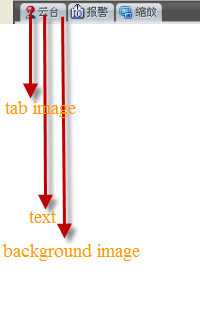
The tab also has to support the nice looked effective and interactions mean that when mouse move, clicked and others states.
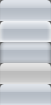
Below we see the physical view of tab background image, including the normal state, mouse over, mouse down, focused and disabled.
Logical structure:
The tabcontrolview will be as div element mean we need to set its property like width, height, margin, padding and others. For the header will be as list with inline display property .
Css style:


/* left side is the tab*/
#LeftSide
{
position:fixed;
width:195px;
height:800px;
margin-top:76px;
left:0px;
border:2px #494949 solid ;
}
/* the tab header */
.LeftSideTabHeader
{
background-image:url('images/OtherBg.png');
background-repeat:repeat-x;
position:fixed;
width:195px;
height:23px;
margin-top:0px;
margin-left:0px;
}
/* header is list*/
.LeftSideTabHeader ul
{
margin:0px;
padding: 0px;
width:195px;
height:20px;
list-style-type:none;
}
/* for all headres.*/
.LeftSideTabHeader ul li
{
float:left;
margin:0px;
padding: 0px 0px 0px 0px;
list-style-type:none;
display:inline;
}
.LeftSide ul li a
{
float:left;
margin:0px;
padding:0px;
width:51px;
height:20px;
}
.LeftSideTabHeader ul li a span
{
float:left;
margin:0px;
padding:0px;
width:51px;
height:20px;
font-family: 宋体;
font-size: 12px;
color:black;
}
/*body*/
#LeftSide .yunTaiTabItem
{
height: 181px;
width:195px;
margin-top:22px;
padding:0px;
position:fixed;
background-image:url('images/左云台背景.png');
background-repeat:repeat-x;
background-position:center;
}
.yunTaiTabItem .yunTaiWheel
{
width:110px;
height: 111px;
margin:0px;
position:fixed;
background-image:url('images/云台.png');
background-position:center;
background-repeat:no-repeat;
}
/* start the left side , yuntai tab1 , the left side of yuntai wheel
---------------------------------------------------------------------------------------
*/
.yunTaiTabItem .buttonsListLeft
{
width:84px;
height:76px;
margin-left:110px;
position: fixed;
margin-top:0px;
}
.buttonsListLeft ul
{
height:76px;
width:21px;
list-style:none;
position:fixed;
margin:0px;
padding:0px;
}
.buttonsListLeft ul li
{
margin:0px;
padding:4px 0px 0px 0px;
display:block;
width:20px;
height: 20px;
}
.buttonsListLeft ul li a
{
margin:0px;
padding:0px;
width:20px;
height: 20px;
cursor:default;
}
.buttonsListLeft ul li a span
{
margin:0px;
padding:0px;
width:20px;
height: 20px;
cursor:default;
font-family: 宋体;
font-size: 12px;
color:black;
}
/* end the left side , yuntai tab1 , the left side of yuntai wheel
---------------------------------------------------------------------------------------
*/
.yunTaiTabItem .slider
{
width:84px;
height:26px;
margin-left:110px;
margin-top:76px;
position: fixed;
border: 1px red dotted;
}
.yunTaiTabItem .buttonsBottomsGallary
{
width:192px;
height:10px;
margin-left:0px;
margin-top:111px;
position: fixed;
border: 1px red dotted;
}
/*
start left side . yuntai tab1, yuntai bottom side
-----------------------**********************************************------------------
*/
.buttonsBottoms
{
width:192px;
height:55px;
margin:0px;
position: fixed;
margin-top:125px;
}
.Side1R
{
margin-left:2px;
padding: 0px;
width:87px;
height:50px;
position:fixed;
border:2px #FFFFFF double;
}
.Side1R ul
{
margin:0px;
padding: 0px;
list-style:none;
width:92px;
height:25px;
position:fixed;
}
.Side1R li
{
display: inline;
width:20px;
height:20px;
padding: 0px;
margin:0px;
position:fixed;
}
.Side1R a
{
margin-top:1px;
margin-left:0px;
padding:0px;
width:20px;
height: 20px;
cursor:default;
position: fixed;
}
.Side1R span
{
margin:0px;
padding:0px;
width:20px;
height: 20px;
cursor:default;
font-family: 宋体;
font-size: 12px;
color:black;
position: fixed;
}
/*
end left side . yuntai tab1, yuntai bottom side
-----------------------**********************************************------------------
*/
<div class="LeftSideTabHeader" >
<ul>
<li>
<a onmousemove="changeState('ltabH1',21,1);" onmouseout="changeState('ltabH1',21,0);" onmousedown="changeState('ltabH1',21,2);" onfocus="changeState('ltabH1',21,4);"onmouseup="changeState('ltabH1',21,1);" >
<span id="ltabH1" style="background-image:url('images/TabViewControl.png'); margin-left:5px;">
<span style="background-image:url('images/图标.gif'); background-repeat:no-repeat; margin-top:2px; margin-left:2px; height:17px; width:16px; position:fixed; background-position:100% -160px;"></span>
<span style=" margin-left:19px; margin-top:4px; position:fixed;width:25px; height:20px; cursor:default;">云台</span>
</span>
</a>
</li>
<li>
<a onmousemove="changeState('ltabH2',21,1);" onmouseout="changeState('ltabH2',21,0);" onmousedown="changeState('ltabH2',21,2);" onfocus="changeState('ltabH2',21,4);"onmouseup="changeState('ltabH2',21,1);" >
<span id="ltabH2" style="background-image:url('images/TabViewControl.png'); margin-left:5px;">
<span style="background-image:url('images/图标.gif'); background-repeat:no-repeat; margin-top:2px; margin-left:2px; height:17px; width:16px;background-position:100% -208px; position:fixed; "></span>
<span style=" margin-left:19px; margin-top:4px; position:fixed;width:25px; height:20px; cursor:default;">报警</span>
</span>
</a>
</li>
<li>
<a onmousemove="changeState('ltabH3',21,1);" onmouseout="changeState('ltabH3',21,0);" onmousedown="changeState('ltabH3',21,2);" onfocus="changeState('ltabH3',21,4);"onmouseup="changeState('ltabH3',21,1);" >
<span id="ltabH3" style="background-image:url('images/TabViewControl.png'); margin-left:5px;">
<span style="background-image:url('images/图标.gif'); background-repeat:no-repeat; margin-top:2px; margin-left:2px; height:17px; width:16px; position:fixed; background-position:100% -176px;"></span>
<span style=" margin-left:19px; margin-top:4px; position:fixed;width:25px; height:20px; cursor:default;">缩放</span>
</span>
</a>
</li>
</ul>
</div>
js for control the css span style .
{
//statNumber the number of state we want to show currently
// elemnt is imageBackground for span
/// 0: normal,1 mouseMove,2 mousepress, 3 focused,4 disable ,
var top=height*statNumber;
document.getElementById(element).style.backgroundPosition='100% -'+top+'px';
}
// hide the image.
function HideIt(element1,element2)
{
document.getElementById(element1).style.display='none';
document.getElementById(element2).style.display='none';
}
function HideItOne(element1)
{
document.getElementById(element1).style.display='none';
}
function ShowItOne(element1)
{
document.getElementById(element1).style.display='block';
}
生产内容,同时打通搜索引擎(SEO)与AI搜索引擎(GEO)流量入口的软件! 点击进入365建站器 »